InformacjeRegulaminPrywatnośćKontakt
 
Aktualizowanie
Adobe Capture: Illustrator, Ps

Adobe Capture: Illustrator, Ps

Opublikowany: 2015-10-05
© 2023 Adobe. All rights reserved.
Adobe Capture: Illustrator, Ps - QR Code
Wersja 9.1.3
4+
Pobierz w App Store
Wersja 9.1.3
4+
Pobierz w App Store
Opublikowany: 2015-10-05
© 2023 Adobe. All rights reserved.

iPhone Screenshots

Obrazek
Obrazek
Obrazek
Obrazek
Obrazek
Obrazek
Obrazek
Obrazek
Obrazek

iPad Screenshots

Obrazek
Obrazek
Obrazek
Obrazek
Obrazek
Obrazek
Obrazek
Obrazek
Obrazek
Obrazek

Opis

"Adobe Capture transforms your images into beautiful color palettes, vectors, fonts, patterns and more.
Imagine looking through your camera to see patterns, vectors, and even fonts. Now imagine turning those visions into design materials to immediately use in apps like Adobe Photoshop, Adobe Illustrator, Adobe Premiere Pro, and Adobe Fresco. The power to transform the world around you into creative assets to build your projects is in the palm of your hands. The creation of graphic design elements is now just a camera click away.
Remove Background from Images
Take your photo inspiration and transform the background to use in your design projects. Create high-quality graphics to use in your projects.
Vectorize on the Go
Create vectors instantly with Shapes. Turn images into smooth, detailed, scalable vectors with 1-32 colors, for use in logos, illustration, animation, and more. Point and shoot at your drawing or upload a photo and watch it magically transform into clean, crisp lines.
Voice or Audio to text
Record your voice to see it transform in text. Replace and add text in your speech directly by editing the transcript. This new audio recording feature is easy to use and will enhance your audio creations. Import audio files to different Adobe apps or download them to your device as WAV files.
Identify Typography
Find your perfect font using Adobe Capture. Take a photo of the type you like (in a magazine, on a label, a sign, anywhere!) and watch a list of similar Adobe Fonts magically appear.
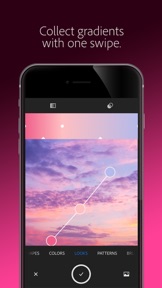
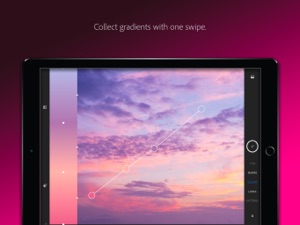
Create Color Themes and Gradients
Looking for customized color palettes? Find an inspiring gradient? Find color by number or hex? Aim your camera at the scene that has the colors you want and capture them to use in your artwork.
Build Beautiful Digital Brushes
Can’t find the right brush to paint? Take a photo or use an image to create digital brushes that match your creative vision. Use your brushes in Photoshop, Illustrator, or Fresco for rich painterly effects.
Craft Intricate Patterns
Capture inspiring images and generate patterns with ease. Create beautiful, colorful patterns that fit with your creative projects by using your vector shapes with our precision pattern builder.
Generate 3D Textures
Generate realistic PBR materials for use in 3D design straight from the camera. Modify your materials for even more texture or blend the edges for seamless repeat tiling on your 3D objects.
Capture Light and Color
Collect light and hue to turn into beautiful color grading profiles for your images and videos with Looks. Record the magic of sunset and transfer that feel to use in your photos and video projects.
Seamlessly Sync Creative Elements
All of your assets save to Adobe Creative Cloud Libraries. Instantly access your digital elements from your Creative Cloud account in all compatible applications.
Compatible Adobe Apps and Programs for Creative Assets
Photoshop, Photoshop for iPad, Adobe Fresco, Premiere Pro, Illustrator, Illustrator for iPad, InDesign, Dimension, After Effects, Dreamweaver, Animate, Substance 3D Apps, and Adobe Express.
2GB FILE STORAGE
The free, basic Creative Cloud membership includes 2GB of complimentary storage for file syncing and sharing.
MORE STORAGE (Optional in-app purchase)
You can purchase an additional 20GB for $1.99 (US dollars) of Creative Cloud file storage per month.
You must be 13 or older and agree to Adobe’s terms and privacy policy, viewable at:
http://www.adobe.com/privacy/policy-linkfree.html
http://www.adobe.com/special/misc/terms.html"

Co nowego w tej wersji? (9.1.3)

What's New in version 9.1.3
New Module: Graphics
Take your photo inspiration and transform the background to use in your projects. You can remove background, blur, or add a solid color to your masked image. Graphics can be used across Creative Cloud in apps like Photoshop, Illustrator, InDesign, After Effects, and Adobe Express through Libraries.
Bug Fixes
Stability improvements
If you enjoy using Adobe Capture, please share a nice review. It really helps!

Sprzedawca

Tytuł

ADOBE SYSTEMS SOFTWARE IRELAND LIMITED

Informacje

Programista

Kategorie

Wersja

9.1.3

Wielkość

384,7 MB

Game Center

Nie

VPP Device Licensing

Tak

Oceny

Wiek: 4+

Kompatybilność

iOS 14.0 lub nowszy

Urządzenia

iPhone 5s, iPhone 6, iPhone 6 Plus, iPhone 6s, iPhone 6s Plus, iPhone SE, iPhone 7, iPhone 7 Plus, iPhone 8, iPhone 8 Plus, iPhone X, iPhone XR, iPhone XS, iPhone XS Max, iPhone 11, iPhone 11 Pro, iPhone 11 Pro Max, iPhone SE (2. generacji), iPhone 12, iPhone 12 Pro, iPhone 12 Pro Max, iPhone 12 mini, iPhone 13, iPhone 13 Pro, iPhone 13 Pro Max, iPhone 13 mini, iPhone SE (3. generacji), iPhone 14, iPhone 14 Plus, iPhone 14 Pro, iPhone 14 Pro Max, iPhone 15, iPhone 15 Plus, iPhone 15 Pro, iPhone 15 Pro Max, iPad (5. generacji) Wi-Fi, iPad (5. generacji) Wi-Fi + Cellular, iPad (6. generacji) Wi-Fi, iPad (6. generacji) Wi-Fi + Cellular, iPad Pro, iPad Pro (Cellular), iPad Pro (9,7-calowy), iPad Pro (9,7-calowy) (Cellular), iPad Pro 12,9 cala (2. generacji), iPad Pro 12,9 cala (2. generacji) Wi-Fi + Cellular, iPad Pro (10,5 cala), iPad Pro (10,5 cala) Wi-Fi + Cellular, iPad Pro (11 cala), iPad Pro (11 cala) Wi-Fi + Cellular, iPad Pro 12,9 cala (3. generacji), iPad Pro 12,9 cala (3. generacji) Wi-Fi + Cellular, iPad Air, iPad Air (Cellular), iPad Air 2, iPad Air 2 (Cellular), iPad Air (3. generacja), iPad Air (3. generacja) Wi-Fi + Cellular, iPad mini Retina, iPad mini Retina (Cellular), iPad mini 3, iPad mini 3 (Cellular), iPad mini 4, iPad mini 4 (Cellular), iPad mini (5. generacji), iPad mini (5. generacji) Wi-Fi + Cellular, iPad (7. generacji) Wi-Fi + Cellular, iPad Pro 11 cali (2. generacji), iPad Pro 11 cali (2. generacji) Wi-Fi + Cellular, iPad Pro 12,9 cala (4. generacji), iPad Pro 12,9 cala (4. generacji) Wi-Fi + Cellular, iPad Air (4. generacji) (Wi-Fi), iPad Air (4. generacji) (Wi-Fi + Cellular), iPad (8. generacji) Wi-Fi, iPad (8. generacji) Wi-Fi + Cellular, iPad Pro 11 cali (3. generacji), iPad Pro 11 cali (3. generacji) Wi-Fi + Cellular, iPad Pro 12,9 cala (5. generacji), iPad Pro 12,9 cala (5. generacji) Wi-Fi + Cellular, iPad (9. generacji), iPad (9. generacji) Wi-Fi + Cellular, iPad mini (6. generacji), iPad mini (6. generacji) Wi-Fi + Cellular, iPad Air (5. generacji), iPad Air (5. generacji) Wi-Fi + Cellular, iPad Pro 11 cali (4. generacji), iPad Pro 11 cali (4. generacji) Wi-Fi + Cellular, iPad Pro 12,9 cala (6. generacji), iPad Pro 12,9 cala (6. generacji) Wi-Fi + Cellular, iPad (10. generacji), iPad (10. generacji) Wi-Fi + Cellular, iPod touch (6. generacja), iPod touch (7. generacji)

Języki

polski, angielski, chiński, czeski, duński, fiński, francuski, hiszpański, japoński, koreański, niderlandzki, niemiecki, norweski Bokmål, portugalski, rosyjski, szwedzki, turecki, włoski

App Store: Oceny

Oceny i recenzje

4,5 z 5 (525 oceny)

App Store: Opinie

2023-10-31

Great, but

Overall a good app, but geez it does crush a lot. While you try to edit your vector graphic inside the app you damage the line quality severely, which is quite an annoying glitch.
bigskaryyokai
Wersja 9.1.2
2021-10-13

Meh…

The whole point of this tool is to create vectorized images out of things we capture, right? Well then why is it that when i export a captured vectorized image into Fresco, it looses its vector properties and I can’t change its size without loosing resolution? I tried looking for resolution settings thinking I missed something but there’s nothing. Disappointed with this tool, I had much higher expectations. In fact, it doesn’t do the most useful thing I need it for.
buihkbhg
Wersja 7.3.1
2021-09-26

Fantastic!

Simple, powerful and very user friendly.
Jaguar Bk
Wersja 7.3.1
2021-09-17

Verry creative tool

I think its great cretive ideas tool. With in combination with Fresco its even more creative. I love it!
Zgubior
Wersja 7.3.1
2020-11-26

Kocham apke

I klove
Materaz
Wersja 7.0.2
2020-10-04

brawo

Fantastyczna!
hewcie
Wersja 6.6.1
2018-03-06

Cool!

Works great for me, sowa what its supposed to
xpirat
Wersja 3.3
2017-07-20

Polecam

Bardzo dobry program do importowania różnych kształtów do programów Adobe.
arkadiuszb
Wersja 2.6.2
2017-06-26

Awesome!

Really enjoying this app :d
PseudoAnonim
Wersja 2.6
2016-11-04

I love

This app
dafilm
Wersja 2.3.1
2016-06-16

Goraco polecam

Super dla laika!
Goral WPR
Wersja 2.0
2016-04-19

perfect

exactly what i needed. must have for every designer
xKaolo
Wersja 1.4
2016-03-19

Cool

Cool
pj_spark
Wersja 1.3