Aktualizowanie


iPhone Screenshots


Opis
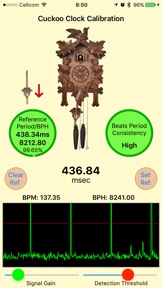
The best and most accurate app for Cuckoo and Pendulum clocks calibration.
Easily measure your Clock beats period and adjust it to a known correct value.
Turn your iPhone into a precise train count sensor with an unbelievable 0.001 milliseconds (1μs) accuracy!!
Get a quick and precise drift reading of how many seconds/minutes your clock is going to gain or loose per day.
Every Cuckoo Clock owner knows that a mechanical clocks are not as accurate as modern day quartz clocks. This is because the clock mechanism is influenced by temperature, humidity, barometric pressure, breeze and others environmental conditions and therefore requires frequent adjustment.
When you are regulating the pendulum of your Cuckoo Clock today, you are attempting to achieve the best timekeeping possible by a trail and error method by lifting the pendulum bob up or down and hope for a better accuracy.
Using this app you can finally get a reading of your Clock ticks timing and precisely calibrate it to a known value.
How to calibrate your Clock using this app:
1. Run this App and measure your Clock timings using the iPhone microphone
2. Use the Signal Gain and the Detection Threshold sliders to adjust the measured signal
3. Select a reference timing for calibration from the clock reference table or set your own reference timing
4. Read the accuracy level of your clock vs. the reference timing
5. Adjust your Clock pendulum bob to get the best accuracy!
6. Review how many seconds/minutes your Clock will gain or lose per day based on your current calibration
The app will presents your Clock beats period reading as well as BPH (beats per hour) and BPM (beats per minutes) values.
An accurate waveform display of the microphone signal will help you to adjust the tick readings for the best measurement.
Animated Indicators will guide you through the calibration process.
Manage the app Reference Timings table and add user defined clocks in addition to the predefined ones to support all your clocks.
This app will turn your iPhone into a powerful measurement tool which normally costs hundreds of dollars.
Co nowego w tej wersji? (2.8)
A digital clock display was added to enable easy current time reading
Informacje
Programista
Kategorie
Wersja
2.8
Wielkość
19,8 MB
Game Center
Nie
VPP Device Licensing
Tak
Oceny
Wiek: 4+
Kompatybilność
iOS 9.0 lub nowszy
Urządzenia
iPhone 4S, iPhone 5, iPhone 5c, iPhone 5s, iPhone 6, iPhone 6 Plus, iPhone 6s, iPhone 6s Plus, iPhone SE, iPhone 7, iPhone 7 Plus, iPhone 8, iPhone 8 Plus, iPhone X, iPhone XR, iPhone XS, iPhone XS Max, iPhone 11, iPhone 11 Pro, iPhone 11 Pro Max, iPhone SE (2. generacji), iPhone 12, iPhone 12 Pro, iPhone 12 Pro Max, iPhone 12 mini, iPhone 13, iPhone 13 Pro, iPhone 13 Pro Max, iPhone 13 mini, iPhone SE (3. generacji), iPhone 14, iPhone 14 Plus, iPhone 14 Pro, iPhone 14 Pro Max, iPhone 15, iPhone 15 Plus, iPhone 15 Pro, iPhone 15 Pro Max, iPhone 16, iPhone 16 Plus, iPhone 16 Pro, iPhone 16 Pro Max, iPhone 16e, iPhone 17, iPhone 17Pro, iPhone 17ProMax, iPhone Air, iPad 2 (Wi-Fi), iPad 2 (3G), iPad (3. generacji) (Wi-Fi), iPad (3. generacji) (4G), iPad (4. generacji) (Wi-Fi), iPad (4. generacji) (4G), iPad (5. generacji) Wi-Fi, iPad (5. generacji) Wi-Fi + Cellular, iPad (6. generacji) Wi-Fi, iPad (6. generacji) Wi-Fi + Cellular, iPad Pro, iPad Pro (Cellular), iPad Pro (9,7-calowy), iPad Pro (9,7-calowy) (Cellular), iPad Pro 12,9 cala (2. generacji), iPad Pro 12,9 cala (2. generacji) Wi-Fi + Cellular, iPad Pro (10,5 cala), iPad Pro (10,5 cala) Wi-Fi + Cellular, iPad Pro (11 cala), iPad Pro (11 cala) Wi-Fi + Cellular, iPad Pro 12,9 cala (3. generacji), iPad Pro 12,9 cala (3. generacji) Wi-Fi + Cellular, iPad Air, iPad Air (Cellular), iPad Air 2, iPad Air 2 (Cellular), iPad Air (3. generacja), iPad Air (3. generacja) Wi-Fi + Cellular, iPad mini (Wi-Fi), iPad mini (4G), iPad mini Retina, iPad mini Retina (Cellular), iPad mini 3, iPad mini 3 (Cellular), iPad mini 4, iPad mini 4 (Cellular), iPad mini (5. generacji), iPad mini (5. generacji) Wi-Fi + Cellular, iPad (7. generacji) Wi-Fi + Cellular, iPad Pro 11 cali (2. generacji), iPad Pro 11 cali (2. generacji) Wi-Fi + Cellular, iPad Pro 12,9 cala (4. generacji), iPad Pro 12,9 cala (4. generacji) Wi-Fi + Cellular, iPad Air (4. generacji) (Wi-Fi), iPad Air (4. generacji) (Wi-Fi + Cellular), iPad (8. generacji) Wi-Fi, iPad (8. generacji) Wi-Fi + Cellular, iPad Pro 11 cali (3. generacji), iPad Pro 11 cali (3. generacji) Wi-Fi + Cellular, iPad Pro 12,9 cala (5. generacji), iPad Pro 12,9 cala (5. generacji) Wi-Fi + Cellular, iPad (9. generacji), iPad (9. generacji) Wi-Fi + Cellular, iPad mini (6. generacji), iPad mini (6. generacji) Wi-Fi + Cellular, iPad Air (5. generacji), iPad Air (5. generacji) Wi-Fi + Cellular, iPad Pro 11 cali (4. generacji), iPad Pro 11 cali (4. generacji) Wi-Fi + Cellular, iPad Pro 12,9 cala (6. generacji), iPad Pro 12,9 cala (6. generacji) Wi-Fi + Cellular, iPad (10. generacji), iPad (10. generacji) Wi-Fi + Cellular, iPad Air 11 cali (M2) Wi-Fi, iPad Air 13 cali (M2) Wi-Fi, iPad Air 13 cali (M2) Wi-Fi + Cellular, iPad Pro 11 cali (M4) Wi-Fi, iPad Pro 11 cali (M4) Wi-Fi + Cellular, iPad Pro 13 cali (M4) Wi-Fi, iPad Pro 13 cali (M4) Wi-Fi + Cellular, iPad mini (A17 Pro) Wi-Fi, iPad mini (A17 Pro) Wi-Fi + Cellular, iPad (A16) Wi-Fi, iPad (A16) Wi-Fi + Cellular, iPad Air 11 cali (M3) Wi‑Fi, iPad Air 11 cali (M3) Wi‑Fi + Cellular, iPad Air 13 cali (M3) Wi‑Fi, iPad Air 13 cali (M3) Wi‑Fi + Cellular, iPad Pro11M5, iPad Pro11M5Cellular, iPad Pro13M5, iPad Pro13M5Cellular, iPod touch (5. generacji), iPod touch (6. generacja), iPod touch (7. generacji)
Języki
angielski
App Store: Oceny
Oceny i recenzje
0,0 z 5 (Brak oceny)
App Store: Opinie
Brak wpisu