Aktualizowanie


iPhone Screenshots


iPad Screenshots


Opis
Company Shortname Required! This app requires a company shortname, which is a unique company identifier which you can get from your company administrator.
Tada! The new HCMtoGo mobile app is here! Before you jump in and download it be sure to take a look at the following.
*IMPORTANT MESSAGE FOR NEW HCMtoGO USERS*
BEFORE YOU LOGIN - employees and managers:
• If your administrator has not setup the new HCMtoGO app for your organization, you will NOT be able to get access. Please check with your manager or company admin to get access to the new app.
• When logging in with HCMtoGO you will need to select the region you are using as well as the Company Shortname (The unique Identification number your company administrator needs to provide to you.)
• After you enter that information you will be prompted to enter in your Company, Username, and Password. If you get stuck on this your COMPANY ADMIN can help you out.
• Companies need to be using approval workflows to process To Do Items.
• Supported Timesheet Profiles are Bulk Hours and Start/End (All Days) only.
• Administrator should provide their company’s Short Name to users for login.
Now that you are ready to join HCMtoGO here are some of the awesome things you can do within the new app to enhance your human resource needs:
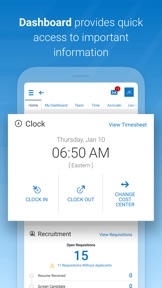
• Check and/or edit your timesheets for accuracy
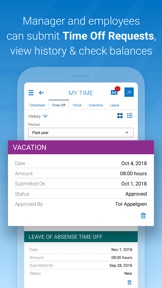
• Submit and view time off requests
• Check vacation/sick balances
• Enroll in benefits and view existing benefits
• Check your schedule
• View pay stubs and manage direct deposits.
• Check your schedule and, if enabled, swap shifts with peers
Your employer must have the HCMtoGO software configured for mobile use. Contact your system administrator for more details.
Key things to know as an administrator:
• Users need to have permission to access the new app via their security profile.
• Users need to be permissioned to have access via their UI Preferences widget within their security profile.
• Companies need to be using approval workflows to process To Do Items.
• Supported Timesheet Profiles are Bulk Hours and Start/End (All Days) only.
• Administrator should provide their company’s Short Name to users for login.
• Basic Authentication with SSO is not currently supported
Co nowego w tej wersji? (1.101.6)
This version introduces an enhancement to the login flow that will save your company shortname and region if you've logged in before.
Informacje
Programista
Kategorie
Wersja
1.101.6
Wielkość
49,1 MB
Game Center
Nie
VPP Device Licensing
Tak
Oceny
Wiek: 4+
Kompatybilność
iOS 13.0 lub nowszy
Urządzenia
iPhone 5s, iPhone 6, iPhone 6 Plus, iPhone 6s, iPhone 6s Plus, iPhone SE, iPhone 7, iPhone 7 Plus, iPhone 8, iPhone 8 Plus, iPhone X, iPhone XR, iPhone XS, iPhone XS Max, iPhone 11, iPhone 11 Pro, iPhone 11 Pro Max, iPhone SE (2. generacji), iPhone 12, iPhone 12 Pro, iPhone 12 Pro Max, iPhone 12 mini, iPhone 13, iPhone 13 Pro, iPhone 13 Pro Max, iPhone 13 mini, iPhone SE (3. generacji), iPhone 14, iPhone 14 Plus, iPhone 14 Pro, iPhone 14 Pro Max, iPhone 15, iPhone 15 Plus, iPhone 15 Pro, iPhone 15 Pro Max, iPhone 16, iPhone 16 Plus, iPhone 16 Pro, iPhone 16 Pro Max, iPhone 16e, iPhone 17, iPhone 17Pro, iPhone 17ProMax, iPhone Air, iPad (5. generacji) Wi-Fi, iPad (5. generacji) Wi-Fi + Cellular, iPad (6. generacji) Wi-Fi, iPad (6. generacji) Wi-Fi + Cellular, iPad Pro, iPad Pro (Cellular), iPad Pro (9,7-calowy), iPad Pro (9,7-calowy) (Cellular), iPad Pro 12,9 cala (2. generacji), iPad Pro 12,9 cala (2. generacji) Wi-Fi + Cellular, iPad Pro (10,5 cala), iPad Pro (10,5 cala) Wi-Fi + Cellular, iPad Pro (11 cala), iPad Pro (11 cala) Wi-Fi + Cellular, iPad Pro 12,9 cala (3. generacji), iPad Pro 12,9 cala (3. generacji) Wi-Fi + Cellular, iPad Air, iPad Air (Cellular), iPad Air 2, iPad Air 2 (Cellular), iPad Air (3. generacja), iPad Air (3. generacja) Wi-Fi + Cellular, iPad mini Retina, iPad mini Retina (Cellular), iPad mini 3, iPad mini 3 (Cellular), iPad mini 4, iPad mini 4 (Cellular), iPad mini (5. generacji), iPad mini (5. generacji) Wi-Fi + Cellular, iPad (7. generacji) Wi-Fi + Cellular, iPad Pro 11 cali (2. generacji), iPad Pro 11 cali (2. generacji) Wi-Fi + Cellular, iPad Pro 12,9 cala (4. generacji), iPad Pro 12,9 cala (4. generacji) Wi-Fi + Cellular, iPad Air (4. generacji) (Wi-Fi), iPad Air (4. generacji) (Wi-Fi + Cellular), iPad (8. generacji) Wi-Fi, iPad (8. generacji) Wi-Fi + Cellular, iPad Pro 11 cali (3. generacji), iPad Pro 11 cali (3. generacji) Wi-Fi + Cellular, iPad Pro 12,9 cala (5. generacji), iPad Pro 12,9 cala (5. generacji) Wi-Fi + Cellular, iPad (9. generacji), iPad (9. generacji) Wi-Fi + Cellular, iPad mini (6. generacji), iPad mini (6. generacji) Wi-Fi + Cellular, iPad Air (5. generacji), iPad Air (5. generacji) Wi-Fi + Cellular, iPad Pro 11 cali (4. generacji), iPad Pro 11 cali (4. generacji) Wi-Fi + Cellular, iPad Pro 12,9 cala (6. generacji), iPad Pro 12,9 cala (6. generacji) Wi-Fi + Cellular, iPad (10. generacji), iPad (10. generacji) Wi-Fi + Cellular, iPad Air 11 cali (M2) Wi-Fi, iPad Air 13 cali (M2) Wi-Fi, iPad Air 13 cali (M2) Wi-Fi + Cellular, iPad Pro 11 cali (M4) Wi-Fi, iPad Pro 11 cali (M4) Wi-Fi + Cellular, iPad Pro 13 cali (M4) Wi-Fi, iPad Pro 13 cali (M4) Wi-Fi + Cellular, iPad mini (A17 Pro) Wi-Fi, iPad mini (A17 Pro) Wi-Fi + Cellular, iPad (A16) Wi-Fi, iPad (A16) Wi-Fi + Cellular, iPad Air 11 cali (M3) Wi‑Fi, iPad Air 11 cali (M3) Wi‑Fi + Cellular, iPad Air 13 cali (M3) Wi‑Fi, iPad Air 13 cali (M3) Wi‑Fi + Cellular, iPod touch (6. generacja), iPod touch (7. generacji)
Języki
polski, angielski, czeski, duński, francuski, hiszpański, niderlandzki, niemiecki, portugalski, rumuński, turecki, włoski
App Store: Oceny
Oceny i recenzje
0,0 z 5 (Brak oceny)
App Store: Opinie
Brak wpisu