Aktualizowanie


iPhone Screenshots




iPad Screenshots



Opis
Here comes Otamatone Studio, the official app for the note-shaped instrument Otamatone. Change your sound!
-About the app
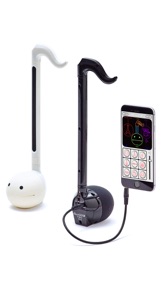
Connect your Otamatone Techno or Otamatone neo to your iPhone or iPad, start Otamatone Studio and play your Otamatone with the sound of various instruments or jam along to built-in rhythms.
We got rid of all the complexities of most available synthesizer simulations and created an app that even beginners will master. It’s really simple!
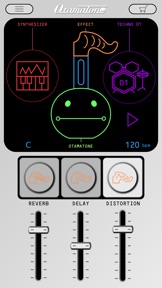
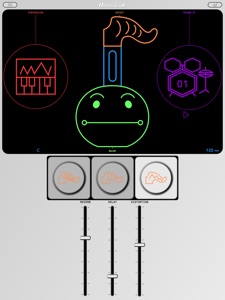
Access all functions via a cute graphical interface that feels like your Otamatone called over a few friends for a basement jam.
-Supported models
・Otamatone neo
・Otamatone Techno
Caution-
You will download a free version of the app. The complete set of features can be unlocked via in-app purchase.
-Main features
●Different sounds
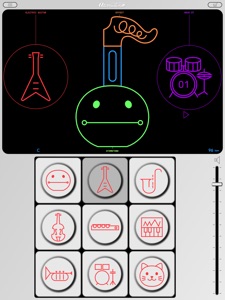
Play your Otamatone with the sound of various instruments. Gather your friends and form a band!
・Instruments(Free Version)
Otamatone / Electric Guitar / Alto Sax
・Instruments (Full Version)
Otamatone / Electric Guitar / Alto Sax
Violin / Flute / Synthesizer
Trumpet / Drums / Cat
Display method
Tap the instrument icon on the right side of the main screen.
●Different scales
With scales your performance will always sound spot on. Play like a pro without all the practicing!
・Scales(Free Version)
Otamatone / 12 Tone / Minor Blues
・Scales (Full Version)
Otamatone / 12 Tone / Minor Blues
Minor / Major / Major Blues
Whole Tone / Pentatonic / Japan
Display method
Tap the face of the Otamatone on the main screen.
●Effects
You can alter your Otamatone’s sound with 3 kinds of effects. Push your performance to new heights!
・Reverb
Ever wanted to sound like performing in a concert hall or a bathroom? Look no further! (Reverb is the only effect in the free version.)
・Delay
Adds an echo to your sound.
・Distortion
The trademark of any rock song. Sound like an electric guitar.
Display method
Tap the tail of the Otamatone on the main screen.
●Built-in rhythms
You can choose between different rhythms to play along to. Be your own personal band!
・Rhythms (Free Version)
Rock01 / Techno01 / Japan
・Rhythms (Full Version)
Rock01 / Techno01 / Japan
Rock02 / Samba / Salsa
March / India / Happy Birthday
Happy Birthday is a band arrangement. Surprise someone special to you by playing along to this tune on his/her birthday and you will certainly leave an impression!
Display method
Tap the rhythm icon on the main screen.
●Virtual keyboard
No Otamatone at hand? Display the virtual keyboard and play with Otamatone Studio nevertheless.
Even better
The Otamatone on the main screen will move its mouth during your performance. It doesn’t get much cuter than that!
Display method
Tap the stem of the Otamatone on the main screen. Hold your smartphone sideways to improve playability.
・・・・・・・・・・・・・・・・・・・・・・・・・・・・・・・・・・・・・・・・・・・・・・・・・・・・・・・・・・・・・・・・・・・・・・・・・・・・・
●Further instructions
Further instructions can be found on the Otamatone website. Check it out!
www.otamatone.jp/otstudio/en
(C)MAYWA DENKI
Produced by CUBE Co., Ltd.
Powered by sonosaurus.com
Co nowego w tej wersji? (1.1.1)
- Updated for latest devices, with minor fixes
Sprzedawca
Tytuł
CUBE Co., Ltd.
Adres URL
Informacje
Programista
Kategorie
Wersja
1.1.1
Wielkość
93,7 MB
Game Center
Nie
VPP Device Licensing
Tak
Oceny
Wiek: 4+
Kompatybilność
iOS 11.0 lub nowszy
Urządzenia
iPhone 5s, iPhone 6, iPhone 6 Plus, iPhone 6s, iPhone 6s Plus, iPhone SE, iPhone 7, iPhone 7 Plus, iPhone 8, iPhone 8 Plus, iPhone X, iPhone XR, iPhone XS, iPhone XS Max, iPhone 11, iPhone 11 Pro, iPhone 11 Pro Max, iPhone SE (2. generacji), iPhone 12, iPhone 12 Pro, iPhone 12 Pro Max, iPhone 12 mini, iPhone 13, iPhone 13 Pro, iPhone 13 Pro Max, iPhone 13 mini, iPhone SE (3. generacji), iPhone 14, iPhone 14 Plus, iPhone 14 Pro, iPhone 14 Pro Max, iPhone 15, iPhone 15 Plus, iPhone 15 Pro, iPhone 15 Pro Max, iPad (5. generacji) Wi-Fi, iPad (5. generacji) Wi-Fi + Cellular, iPad (6. generacji) Wi-Fi, iPad (6. generacji) Wi-Fi + Cellular, iPad Pro, iPad Pro (Cellular), iPad Pro (9,7-calowy), iPad Pro (9,7-calowy) (Cellular), iPad Pro 12,9 cala (2. generacji), iPad Pro 12,9 cala (2. generacji) Wi-Fi + Cellular, iPad Pro (10,5 cala), iPad Pro (10,5 cala) Wi-Fi + Cellular, iPad Pro (11 cala), iPad Pro (11 cala) Wi-Fi + Cellular, iPad Pro 12,9 cala (3. generacji), iPad Pro 12,9 cala (3. generacji) Wi-Fi + Cellular, iPad Air, iPad Air (Cellular), iPad Air 2, iPad Air 2 (Cellular), iPad Air (3. generacja), iPad Air (3. generacja) Wi-Fi + Cellular, iPad mini Retina, iPad mini Retina (Cellular), iPad mini 3, iPad mini 3 (Cellular), iPad mini 4, iPad mini 4 (Cellular), iPad mini (5. generacji), iPad mini (5. generacji) Wi-Fi + Cellular, iPad (7. generacji) Wi-Fi + Cellular, iPad Pro 11 cali (2. generacji), iPad Pro 11 cali (2. generacji) Wi-Fi + Cellular, iPad Pro 12,9 cala (4. generacji), iPad Pro 12,9 cala (4. generacji) Wi-Fi + Cellular, iPad Air (4. generacji) (Wi-Fi), iPad Air (4. generacji) (Wi-Fi + Cellular), iPad (8. generacji) Wi-Fi, iPad (8. generacji) Wi-Fi + Cellular, iPad Pro 11 cali (3. generacji), iPad Pro 11 cali (3. generacji) Wi-Fi + Cellular, iPad Pro 12,9 cala (5. generacji), iPad Pro 12,9 cala (5. generacji) Wi-Fi + Cellular, iPad (9. generacji), iPad (9. generacji) Wi-Fi + Cellular, iPad mini (6. generacji), iPad mini (6. generacji) Wi-Fi + Cellular, iPad Air (5. generacji), iPad Air (5. generacji) Wi-Fi + Cellular, iPad Pro 11 cali (4. generacji), iPad Pro 11 cali (4. generacji) Wi-Fi + Cellular, iPad Pro 12,9 cala (6. generacji), iPad Pro 12,9 cala (6. generacji) Wi-Fi + Cellular, iPad (10. generacji), iPad (10. generacji) Wi-Fi + Cellular, iPod touch (6. generacja), iPod touch (7. generacji)
Języki
App Store: Oceny
Oceny i recenzje
0,0 z 5 (Brak oceny)
App Store: Opinie
Brak wpisu