Aktualizowanie


iPhone Screenshots

iPad Screenshots




Opis
****Carryout Addition step by step****
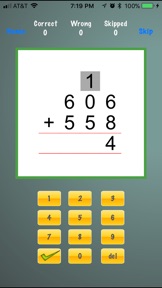
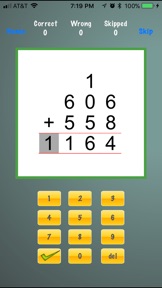
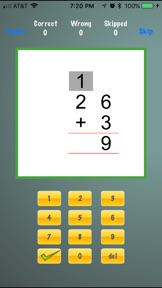
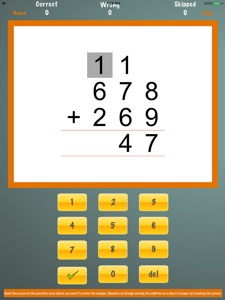
This Application enables you to solve addition problems step by step, just as you would do it on a sheet of paper. Being able to carry out the additions step by step is the key feature of this application.
The application surface area represents a worksheet that’s touch enabled. As you start to do the addition you touch areas on the screen to highlight it and then use the keypad to enter the numbers. You touch at the appropriate places to indicate carry forwards. Application also allows you to setup if you want to do additions that involve carry forward or not.
****How the application works****
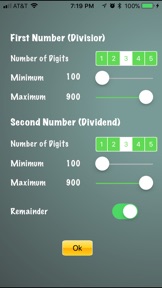
When you start the application it presents a screen where you choose the type of addition you like to practice. You could choose number of digits that you want for top number as well as for second number and also set the range for the numbers; also you could choose if you want the application to present numbers that would result in rounding. Once set, the application presents questions that are generated randomly using the above criteria.
You perform the complete step by step operation needed to complete the addition and then touch the ‘Answer’ button. Once you touch the ‘Answer’ button it will check your answer, if the answer is correct the next problem will be presented, if wrong, the application will let you fix it or provide you the option to skip it.
Parents, as guidance, if the kid is a preschooler/kindergartener and wants to practice basic additions facts, you might choose to start with one or two digits and have rounding turned off. As there confidence grows you may want to enable rounding and have them practice it. As you start to get more comfortable with basic addition you could start to turn it up a notch by increasing the digits with rounding on.
*****Practice, Practice, Practice******
Isn’t that we have heard so many times about Math? Should I really have to carry my workbooks everywhere, isn’t it really so cumbersome to do your workbooks when you are in the car with your parents. With the fabulous technology in your hand you have this fabulous application that I am confident will provide you the tool that you are looking for to improve your grades and become more confident.
*****Finally******
As you can see this application doesn’t become obsolete after just one grade, it is something that you really want to keep with you for quite many years.
I am very confident that this tool will prove to be a tool that will truly help you learning additions and give you the edge that you are looking for in your classroom.
Co nowego w tej wersji? (4.0.0)
Update to support the latest iPhone/iPad devices and the newest iOS version.
Sprzedawca
Tytuł
Power Math Apps LLC
Adres URL
Informacje
Programista
Kategorie
Wersja
4.0.0
Wielkość
2 MB
Game Center
Nie
VPP Device Licensing
Tak
Oceny
Wiek: 4+
Kompatybilność
iOS 12.0 lub nowszy
Urządzenia
iPhone 5s, iPhone 6, iPhone 6 Plus, iPhone 6s, iPhone 6s Plus, iPhone SE, iPhone 7, iPhone 7 Plus, iPhone 8, iPhone 8 Plus, iPhone X, iPhone XR, iPhone XS, iPhone XS Max, iPhone 11, iPhone 11 Pro, iPhone 11 Pro Max, iPhone SE (2. generacji), iPhone 12, iPhone 12 Pro, iPhone 12 Pro Max, iPhone 12 mini, iPhone 13, iPhone 13 Pro, iPhone 13 Pro Max, iPhone 13 mini, iPhone SE (3. generacji), iPhone 14, iPhone 14 Plus, iPhone 14 Pro, iPhone 14 Pro Max, iPhone 15, iPhone 15 Plus, iPhone 15 Pro, iPhone 15 Pro Max, iPhone 16, iPhone 16Plus, iPhone 16Pro, iPhone 16ProMax, iPhone 16e, iPad (5. generacji) Wi-Fi, iPad (5. generacji) Wi-Fi + Cellular, iPad (6. generacji) Wi-Fi, iPad (6. generacji) Wi-Fi + Cellular, iPad Pro, iPad Pro (Cellular), iPad Pro (9,7-calowy), iPad Pro (9,7-calowy) (Cellular), iPad Pro 12,9 cala (2. generacji), iPad Pro 12,9 cala (2. generacji) Wi-Fi + Cellular, iPad Pro (10,5 cala), iPad Pro (10,5 cala) Wi-Fi + Cellular, iPad Pro (11 cala), iPad Pro (11 cala) Wi-Fi + Cellular, iPad Pro 12,9 cala (3. generacji), iPad Pro 12,9 cala (3. generacji) Wi-Fi + Cellular, iPad Air, iPad Air (Cellular), iPad Air 2, iPad Air 2 (Cellular), iPad Air (3. generacja), iPad Air (3. generacja) Wi-Fi + Cellular, iPad mini Retina, iPad mini Retina (Cellular), iPad mini 3, iPad mini 3 (Cellular), iPad mini 4, iPad mini 4 (Cellular), iPad mini (5. generacji), iPad mini (5. generacji) Wi-Fi + Cellular, iPad (7. generacji) Wi-Fi + Cellular, iPad Pro 11 cali (2. generacji), iPad Pro 11 cali (2. generacji) Wi-Fi + Cellular, iPad Pro 12,9 cala (4. generacji), iPad Pro 12,9 cala (4. generacji) Wi-Fi + Cellular, iPad Air (4. generacji) (Wi-Fi), iPad Air (4. generacji) (Wi-Fi + Cellular), iPad (8. generacji) Wi-Fi, iPad (8. generacji) Wi-Fi + Cellular, iPad Pro 11 cali (3. generacji), iPad Pro 11 cali (3. generacji) Wi-Fi + Cellular, iPad Pro 12,9 cala (5. generacji), iPad Pro 12,9 cala (5. generacji) Wi-Fi + Cellular, iPad (9. generacji), iPad (9. generacji) Wi-Fi + Cellular, iPad mini (6. generacji), iPad mini (6. generacji) Wi-Fi + Cellular, iPad Air (5. generacji), iPad Air (5. generacji) Wi-Fi + Cellular, iPad Pro 11 cali (4. generacji), iPad Pro 11 cali (4. generacji) Wi-Fi + Cellular, iPad Pro 12,9 cala (6. generacji), iPad Pro 12,9 cala (6. generacji) Wi-Fi + Cellular, iPad (10. generacji), iPad (10. generacji) Wi-Fi + Cellular, iPad Air 11 cali (M2) Wi-Fi, iPad Air 13 cali (M2) Wi-Fi, iPad Air 13 cali (M2) Wi-Fi + Cellular, iPad Pro 11 cali (M4) Wi-Fi, iPad Pro 11 cali (M4) Wi-Fi + Cellular, iPad Pro 13 cali (M4) Wi-Fi, iPad Pro 13 cali (M4) Wi-Fi + Cellular, iPad A16, iPad A16Cellular, iPad Air11M3, iPad Air11M3Cellular, iPad Air13M3, iPad Air13M3Cellular, iPad MiniA17Pro, iPad MiniA17ProCellular, iPod touch (6. generacja), iPod touch (7. generacji)
Języki
angielski
App Store: Oceny
Oceny i recenzje
0,0 z 5 (Brak oceny)
App Store: Opinie
Brak wpisu