Aktualizowanie

BT Volleyball Camera
Opublikowany: 2024-01-23
© 2025 The Basketball Temple Company


iPhone Screenshots




iPad Screenshots




Opis
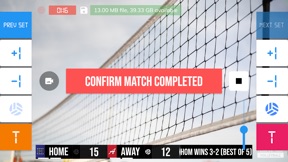
BT Volleyball Camera is a volleyball game recording app that includes set, score, timeout timers, and brand overlays on top of video. BT Volleyball Camera connects seamlessly into the BT Volleyball apps system (e.g. with the the BT Volleyball Scoreboard app, and more) for synchronization of time and score across all devices and remote control. In addition, choose custom pictures from your gallery to display during timeouts! This could be used for custom advertising in your volleyball games. Upgrade your volleyball game footage today with the BT Volleyball Camera and Scoreboard apps!
BT Volleyball Camera App Features:
- Beautiful scoreboard and timer overlays
- Add your custom brand overlay
- Add advertisements to display during pregame, timeouts, and rest periods
- Quick Start Documentation below
The BT Volleyball Camera app was created by The Basketball Temple Company. After the success of our basketball products, we have expanded into other sports. The Basketball Temple Company focuses on high quality academies, leagues, and technologies that are used to support those academies and leagues. We open our technology to the public so everyone in the sports community can experience the same technologies that we use within our institutions.
YouTube Tutorial Video: https://youtu.be/fopYwQPOZ2k
# Quick Start Documentation:
1. Start the BT Camera app on the recording phone
2. On another phone, start the BT Controller
3. Open the connect menu in the BT Controller and connect to the BT Camera with WiFi or Bluetooth
4. Start the game with the BT Controller and the BT Camera should automatically start recording
5. Exit the game on the BT Controller and the BT Camera will automatically stop recording
# Setting Advertisements
1. In the BT Camera app, open the right drawer window by swiping from right to left on the right edge of the screen.
2. Scroll to the bottom and press "Edit Settings"
3. Go to the "Ads" tab
4. Select advertisment images that you wish to display during pregame, timeouts, and rest periods.
5. Press "Save and Exit"
# Setting a Custom Overlay Image
1. Press and hold on the default "The Basketball Temple" overlay on the bottom left.
2. Edit icons should appear. Press the blue edit icon.
3. Choose your custom overlay image.
4. You may add multiple overlay images by press and holding on the current overlay, and pressing the green plus icon.
# Video, Resolution, Record Settings
1. In the BT Camera app, open the right drawer window by swiping from right to left on the right edge of the screen.
2. Scroll to the bottom and press "Edit Settings"
3. Go to the "Misc" tab
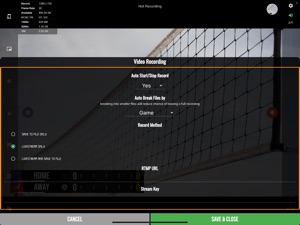
4. Scroll down to "Video Recording" settings
5. Choose your resolution and desired options
# Livestream Settings
1. In the BT Camera app, open the right drawer window by swiping from right to left on the right edge of the screen.
2. Scroll to the bottom and press "Edit Settings"
3. Go to the "Misc" tab
4. Scroll down to "Video Recording" settings
5. Choose "Livestream Only" or "Livestream and Save to File" option
6. Enter values for "RTMP URL" and "Stream Name" fields. This can be found in your livestream platform's stream settings.
Notes:
- An example "RTMP URL" is rtmp://a.rtmp.youtube.com/live2. Do not append your stream name (key) in the URL.
- The "Stream Name" may labeled as "Stream Key" in your livestream platform.
- Any further questions email ken@basketballtemple.com
Co nowego w tej wersji? (5.8.8)
- Added experimental external UVC camera select option compatible with iPad devices with USB-C input and iOS 17 or above.
- Minor improvements
Please submit any issues to support@basketballtemple.com and we will try to handle it promptly. Hope you enjoy the app and thank you very much!
Sprzedawca
Tytuł
The Basketball Temple LLC
Informacje
Programista
Kategorie
Wersja
5.8.8
Wielkość
78,2 MB
Game Center
Nie
VPP Device Licensing
Tak
Oceny
Wiek: 4+
Kompatybilność
iOS 12.0 lub nowszy
Urządzenia
iPhone 5s, iPhone 6, iPhone 6 Plus, iPhone 6s, iPhone 6s Plus, iPhone SE, iPhone 7, iPhone 7 Plus, iPhone 8, iPhone 8 Plus, iPhone X, iPhone XR, iPhone XS, iPhone XS Max, iPhone 11, iPhone 11 Pro, iPhone 11 Pro Max, iPhone SE (2. generacji), iPhone 12, iPhone 12 Pro, iPhone 12 Pro Max, iPhone 12 mini, iPhone 13, iPhone 13 Pro, iPhone 13 Pro Max, iPhone 13 mini, iPhone SE (3. generacji), iPhone 14, iPhone 14 Plus, iPhone 14 Pro, iPhone 14 Pro Max, iPhone 15, iPhone 15 Plus, iPhone 15 Pro, iPhone 15 Pro Max, iPhone 16, iPhone 16Plus, iPhone 16Pro, iPhone 16ProMax, iPhone 16e, iPad (5. generacji) Wi-Fi, iPad (5. generacji) Wi-Fi + Cellular, iPad (6. generacji) Wi-Fi, iPad (6. generacji) Wi-Fi + Cellular, iPad Pro, iPad Pro (Cellular), iPad Pro (9,7-calowy), iPad Pro (9,7-calowy) (Cellular), iPad Pro 12,9 cala (2. generacji), iPad Pro 12,9 cala (2. generacji) Wi-Fi + Cellular, iPad Pro (10,5 cala), iPad Pro (10,5 cala) Wi-Fi + Cellular, iPad Pro (11 cala), iPad Pro (11 cala) Wi-Fi + Cellular, iPad Pro 12,9 cala (3. generacji), iPad Pro 12,9 cala (3. generacji) Wi-Fi + Cellular, iPad Air, iPad Air (Cellular), iPad Air 2, iPad Air 2 (Cellular), iPad Air (3. generacja), iPad Air (3. generacja) Wi-Fi + Cellular, iPad mini Retina, iPad mini Retina (Cellular), iPad mini 3, iPad mini 3 (Cellular), iPad mini 4, iPad mini 4 (Cellular), iPad mini (5. generacji), iPad mini (5. generacji) Wi-Fi + Cellular, iPad (7. generacji) Wi-Fi + Cellular, iPad Pro 11 cali (2. generacji), iPad Pro 11 cali (2. generacji) Wi-Fi + Cellular, iPad Pro 12,9 cala (4. generacji), iPad Pro 12,9 cala (4. generacji) Wi-Fi + Cellular, iPad Air (4. generacji) (Wi-Fi), iPad Air (4. generacji) (Wi-Fi + Cellular), iPad (8. generacji) Wi-Fi, iPad (8. generacji) Wi-Fi + Cellular, iPad Pro 11 cali (3. generacji), iPad Pro 11 cali (3. generacji) Wi-Fi + Cellular, iPad Pro 12,9 cala (5. generacji), iPad Pro 12,9 cala (5. generacji) Wi-Fi + Cellular, iPad (9. generacji), iPad (9. generacji) Wi-Fi + Cellular, iPad mini (6. generacji), iPad mini (6. generacji) Wi-Fi + Cellular, iPad Air (5. generacji), iPad Air (5. generacji) Wi-Fi + Cellular, iPad Pro 11 cali (4. generacji), iPad Pro 11 cali (4. generacji) Wi-Fi + Cellular, iPad Pro 12,9 cala (6. generacji), iPad Pro 12,9 cala (6. generacji) Wi-Fi + Cellular, iPad (10. generacji), iPad (10. generacji) Wi-Fi + Cellular, iPad Air 11 cali (M2) Wi-Fi, iPad Air 13 cali (M2) Wi-Fi, iPad Air 13 cali (M2) Wi-Fi + Cellular, iPad Pro 11 cali (M4) Wi-Fi, iPad Pro 11 cali (M4) Wi-Fi + Cellular, iPad Pro 13 cali (M4) Wi-Fi, iPad Pro 13 cali (M4) Wi-Fi + Cellular, iPad MiniA17Pro, iPad MiniA17ProCellular, iPod touch (6. generacja), iPod touch (7. generacji)
Języki
angielski
App Store: Oceny
Oceny i recenzje
0,0 z 5 (Brak oceny)
App Store: Opinie
Brak wpisu