Aktualizowanie


iPhone Screenshots




Opis
Word Editor: Manage Office Documents. All Your Word Related Documents in One Place!
Experience seamless document editing on the go with Word Editor – the ultimate app for creating, editing, and managing your files anytime, anywhere. Designed for productivity enthusiasts and professionals alike, Word Editor supports a wide range of file types, including DOC, DOCX, XLS, PPT, and PDF making it an essential tool for handling all your documents on your IPHONE and IPAD Devices.
Key Features:
1. Edit & Format Documents with Ease:
Quickly edit DOC and DOCX files with a full range of formatting tools at your fingertips. Adjust fonts, styles, colors, and text alignment to ensure your document looks polished and professional.
2. Comprehensive Spreadsheet Management:
Easily create and edit XLS and XLSX files with intuitive spreadsheet tools. Organize data, perform calculations, and visualize information through built-in charts to stay on top of your tasks.
3. Power Up Presentations:
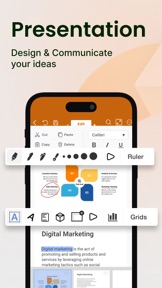
Word Editor supports PPT files, allowing you to create, edit, and customize presentations with ease. Add slides, arrange layouts, and make on-the-spot adjustments, all from the convenience of your mobile device.
4. Convert Files to PDF Easily:
Convert Docx, XLS & PPT files to PDF instantly. Save and share PDF files to anyone.
5. Versatile File Viewer:
Open and view a wide range of file formats without needing additional apps. Access PDFs, DOCX, XLS, and PPT files directly within Word Editor, providing a comprehensive solution for all your document needs.
6. Cloud Sync & Easy File Management:
Seamlessly connect with popular cloud storage services like Google Drive, Dropbox, and OneDrive to access your documents from any device. Word Editor keeps your files organized and accessible, wherever your work takes you.
7. Real-Time Collaboration & Sharing:
Collaborate on documents with colleagues, classmates, or friends by sharing files directly from the app. Whether it’s a quick edit or a final review, Word Editor supports efficient teamwork.
8. Customizable Viewing & Editing Modes:
Switch between light and dark themes, adjust text size, and select a comfortable editing mode that suits your reading and writing preferences.
9. Offline Access:
Word Editor ensures that you can access and work on your documents even without an internet connection. Simply download your files and enjoy editing on the go.
10. Free Trial and Flexible Subscriptions:-
Explore all premium features with a 3-day free trial and unlock powerful tools for editing your documents and files. Choose the plan that fits your needs, monthly or yearly with 3 days free trial, whether you’re working on documents, spreadsheets, or presentations.
You’re free to cancel at any time, with no commitment. Subscriptions are charged to your credit card through your App Store account and will automatically renew unless you cancel at least 24 hours before the current period ends. You can manage or adjust your subscription settings directly in your App Store account after purchase.
Premium Features - Create, Edit, Save, Convert, Export and Share.
Why Choose Word Editor?
This app is your all-in-one solution for document management and productivity. Easily create, edit, view, share, convert and manage documents in seconds. Manage all formats like Docx, XLS, PPTx, PDF etc. Perfect for students, professionals, and anyone in between, this app brings robust editing tools, seamless sharing, and full compatibility with essential file types directly to your device. Say goodbye to juggling multiple apps and streamline your workflow with Word Editor – because staying productive has never been easier.
Additional Information
• Link to the app's Terms of Use - https://sites.google.com/a1apps.co/tc-wordeditorios/home
• Link to the app's Privacy Policy - https://sites.google.com/a1apps.co/privacypolicy-wordeditorios/home
Co nowego w tej wersji? (1.0.21)
1) Lightning-Fast Edits : Enjoy smoother performance when editing Word documents on your iPhone or iPad.
2) Create & Share Effortlessly : Optimized to help you create, edit, and share your files and docs faster than ever.
3) Improved Iphone and Ipad Experience : Small tweaks, big differences! Enjoy a more polished look and feel.
4) Minor Bugs Fixed : Your app is now more stable than ever!
5) Your Docs, Anywhere : Whether you're working on your iPhone or iPad, we've ensured your word documents are ready when you are.
Your Feedback Matters - Keep those suggestions coming, and we’ll keep improving for you!
Sprzedawca
Tytuł
RHO DEVELOPERS LLC
Adres URL
Informacje
Programista
Kategorie
Wersja
1.0.21
Wielkość
254,6 MB
Game Center
Nie
VPP Device Licensing
Tak
Oceny
Wiek: 4+
Kompatybilność
iOS 15.0 lub nowszy
Urządzenia
iPhone 5s, iPhone 6, iPhone 6 Plus, iPhone 6s, iPhone 6s Plus, iPhone SE, iPhone 7, iPhone 7 Plus, iPhone 8, iPhone 8 Plus, iPhone X, iPhone XR, iPhone XS, iPhone XS Max, iPhone 11, iPhone 11 Pro, iPhone 11 Pro Max, iPhone SE (2. generacji), iPhone 12, iPhone 12 Pro, iPhone 12 Pro Max, iPhone 12 mini, iPhone 13, iPhone 13 Pro, iPhone 13 Pro Max, iPhone 13 mini, iPhone SE (3. generacji), iPhone 14, iPhone 14 Plus, iPhone 14 Pro, iPhone 14 Pro Max, iPhone 15, iPhone 15 Plus, iPhone 15 Pro, iPhone 15 Pro Max, iPhone 16, iPhone 16 Plus, iPhone 16 Pro, iPhone 16 Pro Max, iPhone 16e, iPad (5. generacji) Wi-Fi, iPad (5. generacji) Wi-Fi + Cellular, iPad (6. generacji) Wi-Fi, iPad (6. generacji) Wi-Fi + Cellular, iPad Pro, iPad Pro (Cellular), iPad Pro (9,7-calowy), iPad Pro (9,7-calowy) (Cellular), iPad Pro 12,9 cala (2. generacji), iPad Pro 12,9 cala (2. generacji) Wi-Fi + Cellular, iPad Pro (10,5 cala), iPad Pro (10,5 cala) Wi-Fi + Cellular, iPad Pro (11 cala), iPad Pro (11 cala) Wi-Fi + Cellular, iPad Pro 12,9 cala (3. generacji), iPad Pro 12,9 cala (3. generacji) Wi-Fi + Cellular, iPad Air, iPad Air (Cellular), iPad Air 2, iPad Air 2 (Cellular), iPad Air (3. generacja), iPad Air (3. generacja) Wi-Fi + Cellular, iPad mini Retina, iPad mini Retina (Cellular), iPad mini 3, iPad mini 3 (Cellular), iPad mini 4, iPad mini 4 (Cellular), iPad mini (5. generacji), iPad mini (5. generacji) Wi-Fi + Cellular, iPad (7. generacji) Wi-Fi + Cellular, iPad Pro 11 cali (2. generacji), iPad Pro 11 cali (2. generacji) Wi-Fi + Cellular, iPad Pro 12,9 cala (4. generacji), iPad Pro 12,9 cala (4. generacji) Wi-Fi + Cellular, iPad Air (4. generacji) (Wi-Fi), iPad Air (4. generacji) (Wi-Fi + Cellular), iPad (8. generacji) Wi-Fi, iPad (8. generacji) Wi-Fi + Cellular, iPad Pro 11 cali (3. generacji), iPad Pro 11 cali (3. generacji) Wi-Fi + Cellular, iPad Pro 12,9 cala (5. generacji), iPad Pro 12,9 cala (5. generacji) Wi-Fi + Cellular, iPad (9. generacji), iPad (9. generacji) Wi-Fi + Cellular, iPad mini (6. generacji), iPad mini (6. generacji) Wi-Fi + Cellular, iPad Air (5. generacji), iPad Air (5. generacji) Wi-Fi + Cellular, iPad Pro 11 cali (4. generacji), iPad Pro 11 cali (4. generacji) Wi-Fi + Cellular, iPad Pro 12,9 cala (6. generacji), iPad Pro 12,9 cala (6. generacji) Wi-Fi + Cellular, iPad (10. generacji), iPad (10. generacji) Wi-Fi + Cellular, iPad Air 11 cali (M2) Wi-Fi, iPad Air 13 cali (M2) Wi-Fi, iPad Air 13 cali (M2) Wi-Fi + Cellular, iPad Pro 11 cali (M4) Wi-Fi, iPad Pro 11 cali (M4) Wi-Fi + Cellular, iPad Pro 13 cali (M4) Wi-Fi, iPad Pro 13 cali (M4) Wi-Fi + Cellular, iPad mini (A17 Pro) Wi-Fi, iPad mini (A17 Pro) Wi-Fi + Cellular, iPad (A16) Wi-Fi, iPad (A16) Wi-Fi + Cellular, iPad Air 11 cali (M3) Wi‑Fi, iPad Air 11 cali (M3) Wi‑Fi + Cellular, iPad Air 13 cali (M3) Wi‑Fi, iPad Air 13 cali (M3) Wi‑Fi + Cellular, iPod touch (6. generacja), iPod touch (7. generacji)
Języki
polski, angielski, arabski, chiński, francuski, hebrajski, hiszpański, indonezyjski, japoński, koreański, niderlandzki, niemiecki, portugalski, rosyjski, tajski, turecki, wietnamski, włoski
App Store: Oceny
Oceny i recenzje
0,0 z 5 (Brak oceny)
App Store: Opinie
Brak wpisu