Aktualizowanie


iPhone Screenshots

iPad Screenshots


Opis
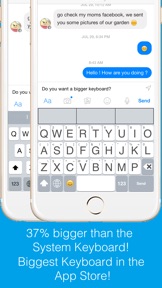
Do you want a bigger keyboard? With the smart highlighted next key hints and fuzzy input? And full Emoji supported? Try out this Biggest keyboard in the App Store!
** Biggest Keyboard in the App Store
Keys are 37% bigger than the system keyboard. It is good for people who have big thumbs. Also people who want to preserve their vision will benefit from this keyboard.
** Fuzzy input
If you use the Apple's system keyboard to input "determination", you won't see it in the suggestion list until typing "determina". With the highlighted keyboard, you can just type "dtmnn" to have it show in the suggestion bar.
Another example is that once I wanted to input "anthropology" but I forgot the spelling, all I remembered was it started with "an" something and ended with "logy", I then typed “anlg” in the Highlighted keyboard and I saw “anthropology” in the suggestion list.
** Highlighted next possible keys
After you type one key the keyboard will smartly highlights the possible next keys that you want to input. Also it has the suggestions that you can select from the top of the keyboard.
** Latin letters supported
You can type the latin letters directly from the keyboard. You can also type "£" & "€" as well.
** Emoji translation
Translate the word that you select in the suggestion bar into Emoji characters. It is a fun way to communicate with your friends and family. It is disabled by default and you need to use the "Keyboard Setting" page to enable this feature.
** Slide to move the input cursor
Sliding from the Space key to left/right to move the current input cursor to left or right. Sliding up to move the current cursor to the beginning of the sentence and sliding down to move the current cursor to the end of the sentence. It makes your life much easier when editing text on the iPhone/iPad.
** 36 most common emojis in the same keyboard without switching UI
Long press on the "happy face" emoji key and it will popup the36 most common emojis. You can then input directly from there.
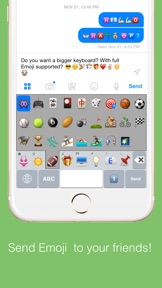
** Full Emoji keys supported
It is very convenience to input Emoji characters with this keyboard when you are using Facebook, Twitter, iMessage, Wechat, Text Message, SMS, etc. Just long press on the key that has sub-menu and more Emoji characters will pop up. The Emoji characters are well categorized and you can input the Emoji and Text together in one keyboard!
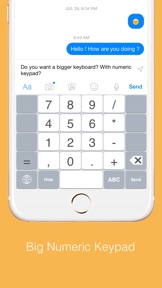
** Numeric Keypad
This keyboard supports the traditional numeric keypad layout with big number keys. It is useful for entering long sequences of numbers quickly.
** Keyboard Settings
Long press on the "globe"/"123" key to pop up the sub-menu. Select the "Tool" key to launch the setting page. You can enable/disable the Highlight Next key feature. You can also enable/disable the "Emoji translation" feature.
** NO Full Access required
** How to use
1. After install you need to enable it in the "Settings" App in your iPhone/iPad.
Launch "Settings", click on "General" -> "Keyboard" -> "Keyboards" -> "Add New Keyboard" -> Select the "HighlightedKeyboard".
2. Switch the keyboard to "Highlighted Keyboard" when you are inputting.
3. Long press on one key to input the keys in the pop-up menu including 0-9 and punctuation marks. You may try to long press on keys to find the hidden sub menus.
For example, if you want to hide the keyboard, long press on the "globe" key and the sub-menu will pop up. Keep holding and move to select the "Hide" key. The keyboard will hide after you release your finger.
Please send any feedback, bug reports or feature request to: feedback.southfun at gmail.com
Thanks for viewing!
Co nowego w tej wersji? (1.2.1)
Fixed the cap lock issue.
Informacje
Programista
Kategorie
Wersja
1.2.1
Wielkość
2 MB
Game Center
Nie
VPP Device Licensing
Tak
Oceny
Wiek: 4+
Kompatybilność
iOS 9.0 lub nowszy
Urządzenia
iPhone 4S, iPhone 5, iPhone 5c, iPhone 5s, iPhone 6, iPhone 6 Plus, iPhone 6s, iPhone 6s Plus, iPhone SE, iPhone 7, iPhone 7 Plus, iPhone 8, iPhone 8 Plus, iPhone X, iPhone XR, iPhone XS, iPhone XS Max, iPhone 11, iPhone 11 Pro, iPhone 11 Pro Max, iPhone SE (2. generacji), iPhone 12, iPhone 12 Pro, iPhone 12 Pro Max, iPhone 12 mini, iPhone 13, iPhone 13 Pro, iPhone 13 Pro Max, iPhone 13 mini, iPhone SE (3. generacji), iPhone 14, iPhone 14 Plus, iPhone 14 Pro, iPhone 14 Pro Max, iPhone 15, iPhone 15 Plus, iPhone 15 Pro, iPhone 15 Pro Max, iPhone 16, iPhone 16 Plus, iPhone 16 Pro, iPhone 16 Pro Max, iPhone 16e, iPhone 17, iPhone 17Pro, iPhone 17ProMax, iPhone Air, iPad 2 (Wi-Fi), iPad 2 (3G), iPad (3. generacji) (Wi-Fi), iPad (3. generacji) (4G), iPad (4. generacji) (Wi-Fi), iPad (4. generacji) (4G), iPad (5. generacji) Wi-Fi, iPad (5. generacji) Wi-Fi + Cellular, iPad (6. generacji) Wi-Fi, iPad (6. generacji) Wi-Fi + Cellular, iPad Pro, iPad Pro (Cellular), iPad Pro (9,7-calowy), iPad Pro (9,7-calowy) (Cellular), iPad Pro 12,9 cala (2. generacji), iPad Pro 12,9 cala (2. generacji) Wi-Fi + Cellular, iPad Pro (10,5 cala), iPad Pro (10,5 cala) Wi-Fi + Cellular, iPad Pro (11 cala), iPad Pro (11 cala) Wi-Fi + Cellular, iPad Pro 12,9 cala (3. generacji), iPad Pro 12,9 cala (3. generacji) Wi-Fi + Cellular, iPad Air, iPad Air (Cellular), iPad Air 2, iPad Air 2 (Cellular), iPad Air (3. generacja), iPad Air (3. generacja) Wi-Fi + Cellular, iPad mini (Wi-Fi), iPad mini (4G), iPad mini Retina, iPad mini Retina (Cellular), iPad mini 3, iPad mini 3 (Cellular), iPad mini 4, iPad mini 4 (Cellular), iPad mini (5. generacji), iPad mini (5. generacji) Wi-Fi + Cellular, iPad (7. generacji) Wi-Fi + Cellular, iPad Pro 11 cali (2. generacji), iPad Pro 11 cali (2. generacji) Wi-Fi + Cellular, iPad Pro 12,9 cala (4. generacji), iPad Pro 12,9 cala (4. generacji) Wi-Fi + Cellular, iPad Air (4. generacji) (Wi-Fi), iPad Air (4. generacji) (Wi-Fi + Cellular), iPad (8. generacji) Wi-Fi, iPad (8. generacji) Wi-Fi + Cellular, iPad Pro 11 cali (3. generacji), iPad Pro 11 cali (3. generacji) Wi-Fi + Cellular, iPad Pro 12,9 cala (5. generacji), iPad Pro 12,9 cala (5. generacji) Wi-Fi + Cellular, iPad (9. generacji), iPad (9. generacji) Wi-Fi + Cellular, iPad mini (6. generacji), iPad mini (6. generacji) Wi-Fi + Cellular, iPad Air (5. generacji), iPad Air (5. generacji) Wi-Fi + Cellular, iPad Pro 11 cali (4. generacji), iPad Pro 11 cali (4. generacji) Wi-Fi + Cellular, iPad Pro 12,9 cala (6. generacji), iPad Pro 12,9 cala (6. generacji) Wi-Fi + Cellular, iPad (10. generacji), iPad (10. generacji) Wi-Fi + Cellular, iPad Air 11 cali (M2) Wi-Fi, iPad Air 13 cali (M2) Wi-Fi, iPad Air 13 cali (M2) Wi-Fi + Cellular, iPad Pro 11 cali (M4) Wi-Fi, iPad Pro 11 cali (M4) Wi-Fi + Cellular, iPad Pro 13 cali (M4) Wi-Fi, iPad Pro 13 cali (M4) Wi-Fi + Cellular, iPad mini (A17 Pro) Wi-Fi, iPad mini (A17 Pro) Wi-Fi + Cellular, iPad (A16) Wi-Fi, iPad (A16) Wi-Fi + Cellular, iPad Air 11 cali (M3) Wi‑Fi, iPad Air 11 cali (M3) Wi‑Fi + Cellular, iPad Air 13 cali (M3) Wi‑Fi, iPad Air 13 cali (M3) Wi‑Fi + Cellular, iPad Pro11M5, iPad Pro11M5Cellular, iPad Pro13M5, iPad Pro13M5Cellular, iPod touch (5. generacji), iPod touch (6. generacja), iPod touch (7. generacji)
Języki
angielski
App Store: Oceny
Oceny i recenzje
0,0 z 5 (Brak oceny)
App Store: Opinie
Brak wpisu