Aktualizowanie


iPhone Screenshots


Opis
Me ™ Is the BEST Caller ID and Spam protection for your iPHONE!
Moreover ME is a social network for your contacts, a place where you can renew connections with old friends and colleagues.
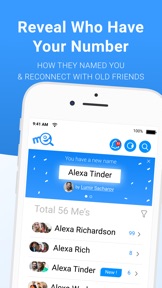
See How your contacts name you.
From now on, you'll always know what people really think about you.
Me is the only app in the world where you can see who saved your number in their Contacts & Reveal exactly who named you and how!
Full 360° Me Spam Protection
Say goodbye to Spammers forever, identify block and filter spam callers and spam text messages with powerful tools.
Updating Spam records 24/7 with our growing community.
* Real Time caller id for SPAM calls integrated with CallKit extension.
* Block SMS spam by filtering text and sender name.Report or block spammers, * robocalls, fraud, scam, nuisance numbers.
Me Caller ID “ Who Calls Me”
Who called me?
* Get Real time notification with caller id from Me to Me users for unknown callers - reveal the true caller name.
* No need to save contacts, once you identify a phone number, we will automatically identify the caller from now on.
* Send WhatsApp without saving the number
* Use Siri Suggestion for Live Caller ID
With MEAPP You will no longer need to save contacts in order to send whatsapp messages
No more unnecessary contacts!
Who saved my number & My “Me” Names
Always know who has your number only with MeApp, Open the “Names” tab and see a list with your names of how your friends save you on their phone, Tap on any given name and watch who is the person that gave you this name.
* Private for you only
* names or send change name request
* Notify on any update someone had made in your contact
Me Powerful T9 Dialer, Call Log, Favorites and Contacts
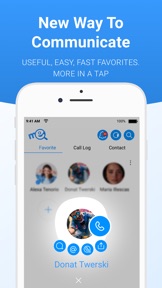
We’ve built the best call app in the market with a powerful dialer that supports reverse number search, easy communication with favorites and access to your recent calls you’ve made from the app. It's time to get contacts to a whole new level.
Identify Calls
Identify a phone number, from share extension, incoming push notification, advanced search or dialer, will be kept where you can access all your non contacts in one place.
CarPlay Support, Identify your calls on your car screen.
Advanced Phone number Search
Type any name or number ‘Me’ will show results categorized and with smart tags for quick filtration.
Searching a phone number was never that easy!
Me Profile
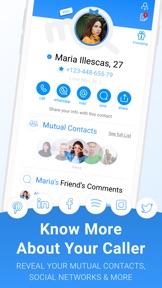
Explore your friends, or other callers profiles with unique features.
Reveal mutual contacts, write comments, watch recent social network posts, birthdays, add notes and more!
Dark Mode
The app fully supports Dark Mode
Offline Mode
Me app will work even when you’re offline.
Backup & Restore
We will make up to 5 back ups of your call log, contacts, favorites, notes and app data automatically.
Me Pro
Upgrade your account and get:
* Get Me Pro badgez
* Restore contacts and your ‘Me’ data
* Who watches my profile and when.
* Remove All Ads
Supporting Widgets and Extensions
Use our smart ‘Me’ widgets and save time, Today’s widget, copy paste numbers for fast lookup and more...
Privacy Control and Public Information
Me is GDPR compliant, we use only what you agree for the app to use, and each privacy access is taken seriously and for a specific feature.
You can edit your profile and decide what details will be shown to others.
Your phonebook is never made searchable nor public
Join now the most powerful Call app in the world and Reveal True Callers.
contact us help@me.app / https://me.app
All rights reserved ® Me ™ MeApp™
(Please note: Payment for auto-renewing subscription to Me PRO will be charged to your iTunes account upon confirmation of purchase. Subscription can be managed and auto-renewal can be turned off by going to the Account Settings on your device. To avoid renewal, you must cancel at least 24 hours before your subscription ends. Your account will be charged for renewal within 24-hours prior to the end of the current period.)
Co nowego w tej wersji? (7.1.8)
Hello Me users,
Happy to provide you this new version which contains many bug fixes
This will be the last version before a new Major version that will be available very soon.
This version requires iOS 14 and up.
this version includes Me business (open soon)
* Fix notification
We fixed several issues in extension :
caller id will now work on all devices, you need to enable a new extension:
Please go to iPhone settings -> Phone -> Call Blocking & Identification ->
Switch on Me -Automatic Spam & Me - Local Numbers to have the full protection.
Fixed issue with Small Screen devices (iPhone SE) which was not able to enable real time caller id.
Fixed an issue with blocking numbers, please verify you have enabled section 1.
Fixed an issue with reporting numbers outside of the app, now it will open the report in the app with the ability to report.
Fixed an issue with Whatsapp Business.
We also fixed many crashes and the app should be more stable now.
Please stay Tuned a new version with new features is on the way!
-------
Live caller id for free
REAL TIME CALLER ID! more info: https://me.app/real-time-caller-id-iphone/
Plus, we've decided to offer the new add-on to everyone for FREE.
So, what can you do with this new feature? You can now know who is calling you before you answer the call in real-time
using two options:
* Double-tap - simply tap twice on the back of your iPhone to display the caller id result in real time.
* You can also ask "Hey Siri, who's calling ME?" during a call, and the ME app will display the caller's name on the screen before you answer.
How to activate:
To ensure that the new call identification feature works for you over time and without issues,
you need to set up the service once:
1. Go to "Me" -> Menu -> Enable Real-Time Call Identification - Install the Shortcut.
2. Set up the double-tap feature to quickly activate call identification when a call comes in:
Settings -> Accessibility -> Touch -> Back Tap -> Choose "Who's Calling Me" from the list
From the next call onwards, you can either say "Hey Siri, who's calling ME?" or double-tap the back of your iPhone to see the caller id result on your screen.
Tips:
* Tapping on the caller id screen "view profile" will open the caller's Me profile for additional actions and information.
For example: Send WhatsApp without saving the contact, view mutual contacts and more...
* All results will be saved in the app under Identified Numbers.
read more : https://me.app/real-time-caller-id-iphone/
Sprzedawca
Tytuł
NFO LTD
Adres URL
Informacje
Programista
Kategorie
Wersja
7.1.8
Wielkość
336,2 MB
Game Center
Nie
VPP Device Licensing
Tak
Oceny
Wiek: 4+
Kompatybilność
iOS 14.0 lub nowszy
Urządzenia
iPhone 5s, iPhone 6, iPhone 6 Plus, iPhone 6s, iPhone 6s Plus, iPhone SE, iPhone 7, iPhone 7 Plus, iPhone 8, iPhone 8 Plus, iPhone X, iPhone XR, iPhone XS, iPhone XS Max, iPhone 11, iPhone 11 Pro, iPhone 11 Pro Max, iPhone SE (2. generacji), iPhone 12, iPhone 12 Pro, iPhone 12 Pro Max, iPhone 12 mini, iPhone 13, iPhone 13 Pro, iPhone 13 Pro Max, iPhone 13 mini, iPhone SE (3. generacji), iPhone 14, iPhone 14 Plus, iPhone 14 Pro, iPhone 14 Pro Max, iPhone 15, iPhone 15 Plus, iPhone 15 Pro, iPhone 15 Pro Max, iPad (5. generacji) Wi-Fi, iPad (5. generacji) Wi-Fi + Cellular, iPad (6. generacji) Wi-Fi, iPad (6. generacji) Wi-Fi + Cellular, iPad Pro, iPad Pro (Cellular), iPad Pro (9,7-calowy), iPad Pro (9,7-calowy) (Cellular), iPad Pro 12,9 cala (2. generacji), iPad Pro 12,9 cala (2. generacji) Wi-Fi + Cellular, iPad Pro (10,5 cala), iPad Pro (10,5 cala) Wi-Fi + Cellular, iPad Pro (11 cala), iPad Pro (11 cala) Wi-Fi + Cellular, iPad Pro 12,9 cala (3. generacji), iPad Pro 12,9 cala (3. generacji) Wi-Fi + Cellular, iPad Air, iPad Air (Cellular), iPad Air 2, iPad Air 2 (Cellular), iPad Air (3. generacja), iPad Air (3. generacja) Wi-Fi + Cellular, iPad mini Retina, iPad mini Retina (Cellular), iPad mini 3, iPad mini 3 (Cellular), iPad mini 4, iPad mini 4 (Cellular), iPad mini (5. generacji), iPad mini (5. generacji) Wi-Fi + Cellular, iPad (7. generacji) Wi-Fi + Cellular, iPad Pro 11 cali (2. generacji), iPad Pro 11 cali (2. generacji) Wi-Fi + Cellular, iPad Pro 12,9 cala (4. generacji), iPad Pro 12,9 cala (4. generacji) Wi-Fi + Cellular, iPad Air (4. generacji) (Wi-Fi), iPad Air (4. generacji) (Wi-Fi + Cellular), iPad (8. generacji) Wi-Fi, iPad (8. generacji) Wi-Fi + Cellular, iPad Pro 11 cali (3. generacji), iPad Pro 11 cali (3. generacji) Wi-Fi + Cellular, iPad Pro 12,9 cala (5. generacji), iPad Pro 12,9 cala (5. generacji) Wi-Fi + Cellular, iPad (9. generacji), iPad (9. generacji) Wi-Fi + Cellular, iPad mini (6. generacji), iPad mini (6. generacji) Wi-Fi + Cellular, iPad Air (5. generacji), iPad Air (5. generacji) Wi-Fi + Cellular, iPad Pro 11 cali (4. generacji), iPad Pro 11 cali (4. generacji) Wi-Fi + Cellular, iPad Pro 12,9 cala (6. generacji), iPad Pro 12,9 cala (6. generacji) Wi-Fi + Cellular, iPad (10. generacji), iPad (10. generacji) Wi-Fi + Cellular, iPod touch (6. generacja), iPod touch (7. generacji)
Języki
angielski, arabski, francuski, grecki, hebrajski, hindi, hiszpański, malajski, perski, portugalski, rosyjski, turecki, włoski
App Store: Oceny
Oceny i recenzje
4,0 z 5 (3 oceny)
App Store: Opinie
Brak wpisu