InformacjeRegulaminPrywatnośćKontakt
 
Aktualizowanie
oneSafe+ password manager

oneSafe+ password manager

Opublikowany: 2017-02-02
© Lunabee Pte Ltd
oneSafe+ password manager - QR Code
Wersja 5.2.9
4+
Pobierz w App Store
Wersja 5.2.9
4+
Pobierz w App Store
Opublikowany: 2017-02-02
© Lunabee Pte Ltd

iPhone Screenshots

Obrazek
Obrazek
Obrazek
Obrazek
Obrazek
Obrazek

iPad Screenshots

Obrazek
Obrazek
Obrazek

Opis

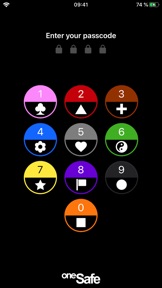
oneSafe provides advanced security for your passwords with features like Touch and Face ID, auto-lock, decoy safe, intrusion detection, self-destruct mode and double protection for your most sensitive data.
NEW! oneSafe+ now supports Dark Mode, Siri shortcuts, an Apple Watch app, iOS universal (super fast) search in Spotlight, and many other iOS 13 improvements.
You can even sync your secured info across various devices via iCloud Drive, CloudKit or Dropbox to have your passwords available whenever and wherever you need them.
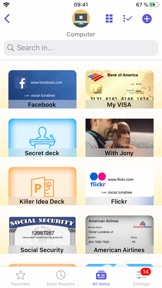
oneSafe protects your confidential information with AES-256 encryption; the highest level of encryption on mobile devices. Passwords, documents, photos, credit card numbers, bank account details, PIN codes and much more can all be locked away securely inside your safe – and at the same time be accessible whenever you need them. Plus, oneSafe adapts to your preferences allowing you to change the colors and images of your safe for maximum customization.
> THEY LOVE oneSafe
• Apple Editor's Choice, best new app in 80 countries!
• "oneSafe has cuter graphics than its rivals" [New York Times]
• "Even though oneSafe is incredibly powerful, it remains incredibly user-friendly." [iMore]
• "Listed in top password managers" [Cnet]
• "oneSafe is well built, robust, and easy to use" [Marco Tabini]
• "If you want to protect and secure your data like Fort Knox, oneSafe is your solution." [AppDictions.com]
oneSafe is ultra secure, easy to use and provides an unequaled user experience. Keep all your confidential information secure and easily accessible when you need it – with oneSafe!
> SECURITY first
oneSafe incorporates the strongest encryption algorithm available on mobile devices (AES-256). All your data is automatically encrypted as soon as it's stored in the app, even the synched content. oneSafe also makes your entry password unhackable by using encryption standards involving extremely complex calculations. In addition, oneSafe comes with numerous advanced security options allowing you to manage your level of security: double-protection categories, auto-lock feature, password generator, decoy safe, self-destruct option, break-in attempts monitoring and a password change reminder.
> SYNC your content, the way you want
• You control at all times which categories are synched and which are not.
• Your info is synched via iCloud or Dropbox. Before being sent to the server it’s encrypted with AES-256 for the maximum possible level of security.
• You don't want to use the cloud? Choose the manual sync option!
> FEATURES that will make your life easier
• Password safety analysis.
• iOS universal search in Spotlight.
• Large step-by-step password reader.
• Integration with Withings watch, securing oneSafe based on the watch's distance from your iPhone or iPad.
• Create, browse and edit your items super easily.
• Adapt your safe with customizable categories to keep all your information well organized.
• Use ready-made templates to quickly and easily enter your data.
• Take advantage of the ultra-secure built-in browser with auto-fill feature to access websites quickly and securely.
• Back up your data (via email, iTunes or Wi-Fi) to be sure you’ll always have a copy in storage.
• Change the texture, icon and color for any of your items.
• Flag items as 'Favorites' for quick access to your most commonly used information.
• Use the ‘Search’ feature to find items quickly within your database.
• Sync the contents of your safe between your devices using iCloud (iCloud Drive or CloudKit), and/or Dropbox.
• Use the bullet-proof "Secure sharing" feature to share your confidential data with your family, friends or colleagues.
Store in complete security:
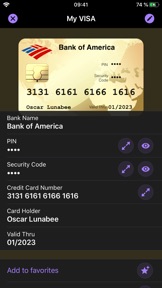
• Credit card numbers
• PIN codes and entry codes
• Social security and tax numbers
• Bank account details
• Usernames and passwords
• Documents in PDF, Word, Excel and more
• Private photos and videos

Co nowego w tej wersji? (5.2.9)

Fix an iOS 18 related bug

Informacje

Kategorie

Wersja

5.2.9

Wielkość

180,5 MB

Game Center

Nie

VPP Device Licensing

Tak

Oceny

Wiek: 4+

Kompatybilność

iOS 16.4 lub nowszy

Urządzenia

iPhone 5s, iPhone 6, iPhone 6 Plus, iPhone 6s, iPhone 6s Plus, iPhone SE, iPhone 7, iPhone 7 Plus, iPhone 8, iPhone 8 Plus, iPhone X, iPhone XR, iPhone XS, iPhone XS Max, iPhone 11, iPhone 11 Pro, iPhone 11 Pro Max, iPhone SE (2. generacji), iPhone 12, iPhone 12 Pro, iPhone 12 Pro Max, iPhone 12 mini, iPhone 13, iPhone 13 Pro, iPhone 13 Pro Max, iPhone 13 mini, iPhone SE (3. generacji), iPhone 14, iPhone 14 Plus, iPhone 14 Pro, iPhone 14 Pro Max, iPhone 15, iPhone 15 Plus, iPhone 15 Pro, iPhone 15 Pro Max, iPhone 16, iPhone 16 Plus, iPhone 16 Pro, iPhone 16 Pro Max, iPhone 16e, iPhone 17, iPhone 17Pro, iPhone 17ProMax, iPhone Air, iPad (5. generacji) Wi-Fi, iPad (5. generacji) Wi-Fi + Cellular, iPad (6. generacji) Wi-Fi, iPad (6. generacji) Wi-Fi + Cellular, iPad Pro, iPad Pro (Cellular), iPad Pro (9,7-calowy), iPad Pro (9,7-calowy) (Cellular), iPad Pro 12,9 cala (2. generacji), iPad Pro 12,9 cala (2. generacji) Wi-Fi + Cellular, iPad Pro (10,5 cala), iPad Pro (10,5 cala) Wi-Fi + Cellular, iPad Pro (11 cala), iPad Pro (11 cala) Wi-Fi + Cellular, iPad Pro 12,9 cala (3. generacji), iPad Pro 12,9 cala (3. generacji) Wi-Fi + Cellular, iPad Air, iPad Air (Cellular), iPad Air 2, iPad Air 2 (Cellular), iPad Air (3. generacja), iPad Air (3. generacja) Wi-Fi + Cellular, iPad mini Retina, iPad mini Retina (Cellular), iPad mini 3, iPad mini 3 (Cellular), iPad mini 4, iPad mini 4 (Cellular), iPad mini (5. generacji), iPad mini (5. generacji) Wi-Fi + Cellular, iPad (7. generacji) Wi-Fi + Cellular, iPad Pro 11 cali (2. generacji), iPad Pro 11 cali (2. generacji) Wi-Fi + Cellular, iPad Pro 12,9 cala (4. generacji), iPad Pro 12,9 cala (4. generacji) Wi-Fi + Cellular, iPad Air (4. generacji) (Wi-Fi), iPad Air (4. generacji) (Wi-Fi + Cellular), iPad (8. generacji) Wi-Fi, iPad (8. generacji) Wi-Fi + Cellular, iPad Pro 11 cali (3. generacji), iPad Pro 11 cali (3. generacji) Wi-Fi + Cellular, iPad Pro 12,9 cala (5. generacji), iPad Pro 12,9 cala (5. generacji) Wi-Fi + Cellular, iPad (9. generacji), iPad (9. generacji) Wi-Fi + Cellular, iPad mini (6. generacji), iPad mini (6. generacji) Wi-Fi + Cellular, iPad Air (5. generacji), iPad Air (5. generacji) Wi-Fi + Cellular, iPad Pro 11 cali (4. generacji), iPad Pro 11 cali (4. generacji) Wi-Fi + Cellular, iPad Pro 12,9 cala (6. generacji), iPad Pro 12,9 cala (6. generacji) Wi-Fi + Cellular, iPad (10. generacji), iPad (10. generacji) Wi-Fi + Cellular, iPad Air 11 cali (M2) Wi-Fi, iPad Air 13 cali (M2) Wi-Fi, iPad Air 13 cali (M2) Wi-Fi + Cellular, iPad Pro 11 cali (M4) Wi-Fi, iPad Pro 11 cali (M4) Wi-Fi + Cellular, iPad Pro 13 cali (M4) Wi-Fi, iPad Pro 13 cali (M4) Wi-Fi + Cellular, iPad mini (A17 Pro) Wi-Fi, iPad mini (A17 Pro) Wi-Fi + Cellular, iPad (A16) Wi-Fi, iPad (A16) Wi-Fi + Cellular, iPad Air 11 cali (M3) Wi‑Fi, iPad Air 11 cali (M3) Wi‑Fi + Cellular, iPad Air 13 cali (M3) Wi‑Fi, iPad Air 13 cali (M3) Wi‑Fi + Cellular, iPod touch (6. generacja), iPod touch (7. generacji), Apple Watch Series 4

Języki

polski, angielski, chiński, francuski, hiszpański, japoński, koreański, niemiecki, portugalski, rosyjski, włoski

App Store: Oceny

Oceny i recenzje

4,5 z 5 (37 oceny)

App Store: Opinie

2020-08-12

Najlepsza aplikacja do haseł

Jeśli szukasz w dobrej cenie programu do przechowywania haseł z możliwością dużej personalizacji jak ikony, kategorie itd to jest to najlepszy stosunek do ceny. Kupować !!!
Gabrobo
Wersja 5.0.7
2019-12-26

Works great!

Overall, I am very satisfied with oneSafe. It just works for me keeping all my paswords securely stored in one place. Great experience.
Tiomz
Wersja 5.0.5
2019-02-07

Fine app, but...

It would be great if I could create an entry while trying to auto fill user name/pwd.
wgW2X7REe)nf;pY*3f;l
Wersja 4.3.1
2018-11-23

Język polski ???

Za co mam płacić!!!! Gdzie jest język polski o którym piszecie w opisie. Naciągajcie klientów.
NADIR1957
Wersja 4.3.1
2018-09-27

Bardzo dobra i pomocna aplikacja za dobrą cenę. Paweł

Jest ok.
Paweł C
Wersja 4.3.1
2018-01-31

They broke a great app

I’ve been using this up for couple of years. I think it was the best password manager. But since a couple of weeks everytime I open it, there is a process of optimizing the app which lasts a minute or two. It’s really annoying. The app now is useless.
MarcinK37
Wersja 4.2.5
2017-10-30

Świetna aplikacja

Polecam każdemu, kto szuka aplikacji do zarządzania hasłami oraz przechowywania ważnych informacji.
Bobsonik
Wersja 4.2.2
2017-09-18

polski

Na stronie jest napisane iż aplikacja jest w języku polskim, jest to kłamstwo.
radwan77
Wersja 4.1.1
2017-07-28

Overall OK but synchronisation fails

OneSafe both version 3 and version 4 are having problem with data sync across devices. The app itself works and looks good but if you are going to use it on more than one device your experience is going to be a nightmare.
The developer is obviously not going to fix those problems as the app is not updated on the regular basis. When I reported the problems with synchronization using iCloud or CloudKit they advised me to use Dropbox but it does not work much better.
k1m0-pl
Wersja 4.1.1