InformacjeRegulaminPrywatnośćKontakt
 
Aktualizowanie
Grapholite Diagrams Maker

Grapholite Diagrams Maker

Opublikowany: 2015-01-06
© 2010-2023 Evgeny Akinshin
Grapholite Diagrams Maker - QR Code
Wersja 5.7.9
4+
Pobierz w App Store
Wersja 5.7.9
4+
Pobierz w App Store
Opublikowany: 2015-01-06
© 2010-2023 Evgeny Akinshin

iPhone Screenshots

Obrazek
Obrazek
Obrazek
Obrazek

iPad Screenshots

Obrazek
Obrazek
Obrazek
Obrazek
Obrazek
Obrazek
Obrazek
Obrazek

Opis

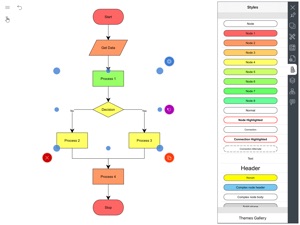
Draw flow charts, floor plans, network layouts, uml, sketches & illustrations
Grapholite is an all-in-one diagrams designer aimed to create all types of business graphics and technical drawings from simple drafts and sketches to complex professional looking documents.
Despite the fact that app was designed with tablet devices in mind it contains all features that can be expected from the mature state-of-the-art diagramming solutions: a rich set of built-in themes and styles, sophisticated connection auto-routing algorithms, dynamic snap grid and integrated spline editor. The unique “sketch” mode allows single-click styling of any figure as if it is sketched by hand.
You can create basic shapes and connections very quickly thanks to the freehand drawing recognition. For complex drawings, there are hundreds of ready-to-use stencils on the toolbox that can be easily dragged to the canvas. Most of these stencils are not just static images, but complex objects with plenty of properties setting up their appearance and behavior in the designer.
Grapholite can be used for:
• Flow charts;
• Swimlanes;
• Organizational charts;
• Uml diagrams;
• Web site structures and wireframes;
• Application’s interface sketches (ui mockups);
• Computer network layouts (including Cisco networks);
• Floor plans (office layouts, building plans, home plans etc.);
• Business process models (both bpmn 1.2 and bpmn 2.0 notations are supported);
• Mind maps and brainstorming diagrams;
• Venn charts and set charts;
• Data flow diagrams;
• Process flow diagrams;
• Workflows;
• Chevron and circular diagrams;
• Swot analysis;
• Scientific illustrations;
• Graphs, algorithms, schemes;
• Planograms;
• Infographics.
The app provides a unique set of shape behaviors for each diagram type. For example, windows and doors will automatically connect to walls in floor plans; shapes support automatic layout of children and collapsing\expanding of the hierarchy levels in org charts and mind maps. Connections auto-routing logic also depends on the diagram type.
Objects tree pane allows you to inspect, select, lock and hide all visual objects.
Print, share, export your diagrams and insert them in your web-sites, blog posts, publications, articles, documents, spreadsheets, presentations and other media.
Grapholite supports export to Pdf, Png, Jpeg, Svg and Microsoft Visio (Vdx) formats. You can also import Microsoft Visio files from both Vdx and Vsdx (Visio 2013) formats.

Co nowego w tej wersji? (5.7.9)

- Bug fixes and performance improvements

Sprzedawca

Tytuł

Evgeny Akinshin

Informacje

Programista

Kategorie

Wersja

5.7.9

Wielkość

70,9 MB

Game Center

Nie

VPP Device Licensing

Tak

Oceny

Wiek: 4+

Kompatybilność

iOS 12 lub nowszy

Urządzenia

iPhone 5s, iPhone 6, iPhone 6 Plus, iPhone 6s, iPhone 6s Plus, iPhone SE, iPhone 7, iPhone 7 Plus, iPhone 8, iPhone 8 Plus, iPhone X, iPhone XR, iPhone XS, iPhone XS Max, iPhone 11, iPhone 11 Pro, iPhone 11 Pro Max, iPhone SE (2. generacji), iPhone 12, iPhone 12 Pro, iPhone 12 Pro Max, iPhone 12 mini, iPhone 13, iPhone 13 Pro, iPhone 13 Pro Max, iPhone 13 mini, iPhone SE (3. generacji), iPhone 14, iPhone 14 Plus, iPhone 14 Pro, iPhone 14 Pro Max, iPhone 15, iPhone 15 Plus, iPhone 15 Pro, iPhone 15 Pro Max, iPad (5. generacji) Wi-Fi, iPad (5. generacji) Wi-Fi + Cellular, iPad (6. generacji) Wi-Fi, iPad (6. generacji) Wi-Fi + Cellular, iPad Pro, iPad Pro (Cellular), iPad Pro (9,7-calowy), iPad Pro (9,7-calowy) (Cellular), iPad Pro 12,9 cala (2. generacji), iPad Pro 12,9 cala (2. generacji) Wi-Fi + Cellular, iPad Pro (10,5 cala), iPad Pro (10,5 cala) Wi-Fi + Cellular, iPad Pro (11 cala), iPad Pro (11 cala) Wi-Fi + Cellular, iPad Pro 12,9 cala (3. generacji), iPad Pro 12,9 cala (3. generacji) Wi-Fi + Cellular, iPad Air, iPad Air (Cellular), iPad Air 2, iPad Air 2 (Cellular), iPad Air (3. generacja), iPad Air (3. generacja) Wi-Fi + Cellular, iPad mini Retina, iPad mini Retina (Cellular), iPad mini 3, iPad mini 3 (Cellular), iPad mini 4, iPad mini 4 (Cellular), iPad mini (5. generacji), iPad mini (5. generacji) Wi-Fi + Cellular, iPad (7. generacji) Wi-Fi + Cellular, iPad Pro 11 cali (2. generacji), iPad Pro 11 cali (2. generacji) Wi-Fi + Cellular, iPad Pro 12,9 cala (4. generacji), iPad Pro 12,9 cala (4. generacji) Wi-Fi + Cellular, iPad Air (4. generacji) (Wi-Fi), iPad Air (4. generacji) (Wi-Fi + Cellular), iPad (8. generacji) Wi-Fi, iPad (8. generacji) Wi-Fi + Cellular, iPad Pro 11 cali (3. generacji), iPad Pro 11 cali (3. generacji) Wi-Fi + Cellular, iPad Pro 12,9 cala (5. generacji), iPad Pro 12,9 cala (5. generacji) Wi-Fi + Cellular, iPad (9. generacji), iPad (9. generacji) Wi-Fi + Cellular, iPad mini (6. generacji), iPad mini (6. generacji) Wi-Fi + Cellular, iPad Air (5. generacji), iPad Air (5. generacji) Wi-Fi + Cellular, iPad Pro 11 cali (4. generacji), iPad Pro 11 cali (4. generacji) Wi-Fi + Cellular, iPad Pro 12,9 cala (6. generacji), iPad Pro 12,9 cala (6. generacji) Wi-Fi + Cellular, iPad (10. generacji), iPad (10. generacji) Wi-Fi + Cellular, iPod touch (6. generacja), iPod touch (7. generacji)

Języki

angielski, francuski, hiszpański, niemiecki, rosyjski, włoski

App Store: Oceny

Oceny i recenzje

0,0 z 5 (Brak oceny)

App Store: Opinie

2021-11-05

Problem z eksportem do pliku

Witam. Sama aplikacja jest świetna (znam już od dawsna z Windowsa), ale ma jeden główny problem, który polega na tym, że proces eksportu do pliku zawiesza się i plik nie zostaje utworzony. Trzeba samemu robić zrzut ekranu i zapisywać go do pliku png, gif lub jpg.
Flaga_m
Wersja 5.7.1